
How IAM Roles for Service Accounts Work in EKS
Follow IRSA from Pod admission and projected service-account tokens to AWS STS credentials and the node-role fallback.
In this article
Within Amazon EKS, we use IAM Role for Service Account (IRSA) or EKS Pod Identity to grant applications permission to call AWS APIs. While Pod Identity Agent won’t be covered in this article, we’ll explore how IRSA works in your EKS cluster. Understanding this feature better will help you troubleshoot issues when they arise.
What is IRSA and Why Do We Need It?
Applications running in your cluster may need to call AWS APIs to manage AWS resources. For example, when you install an EKS Add-on like the EBS CSI Controller, it needs to interact with AWS APIs to perform tasks such as mounting EBS volumes to EKS worker nodes. The kubelet can then mount these volumes into Pods via the Container Storage Interface.
Let’s look at an example of a Service Account. In the following output, we can see the Service Account s3-readonly-sa has an annotation eks.amazonaws.com/role-arn with the value arn:aws:iam::123456789012:role/AmazonEKSPodS3ReadOnlyAccessRole:
kubectl describe sa s3-readonly-sa
Name:                s3-readonly-sa
Namespace:           default
Labels:              <none>
Annotations:         eks.amazonaws.com/role-arn: arn:aws:iam::123456789012:role/AmazonEKSPodS3ReadOnlyAccessRole
Image pull secrets:  <none>
Mountable secrets:   <none>
Tokens:              <none>
Events:              <none>
This means that any Pod associated with this service account will be granted permissions to operate AWS APIs according to the IAM policies attached to the specified IAM role.
How IRSA Works
Step 1: Pod Mutation
You might wonder, “How does the Service Account give a Pod permission to call AWS APIs?”
Pod creation request → Kubernetes API server → pod-identity-webhook
  → mutated Pod specification → kubelet → projected service-account token
When a Pod is created, the Kubernetes API server receives the creation request. In EKS, a pre-installed AdmissionWebhook called pod-identity-webhook intercepts this request. The API server passes the Pod manifest to the assigned controller, which then mutates or validates the Pod specification.
Here’s an example of the MutatingWebhook resource installed in an EKS cluster. Notice in the Rules block that it’s registered for verb=CREATE requestURI=/v1/pods/:
kubectl describe mutatingwebhookconfiguration pod-identity-webhook
Name:         pod-identity-webhook
Namespace:
Labels:       <none>
Annotations:  <none>
API Version:  admissionregistration.k8s.io/v1
Kind:         MutatingWebhookConfiguration
Metadata:
  Creation Timestamp:  <redacted>
  Generation:          1
  Resource Version:    296
  UID:                 <redacted>
Webhooks:
  Admission Review Versions:
    v1beta1
  Client Config:
    Ca Bundle:
    URL:           https://127.0.0.1:23443/mutate
  Failure Policy:  Ignore
  Match Policy:    Equivalent
  Name:           iam-for-pods.amazonaws.com
  Namespace Selector:
  Object Selector:
  Reinvocation Policy:  IfNeeded
  Rules:
    API Groups:
    API Versions:
      v1
    Operations:
      CREATE
    Resources:
      pods
    Scope:          *
  Side Effects:     None
  Timeout Seconds:  10
Events:             <none>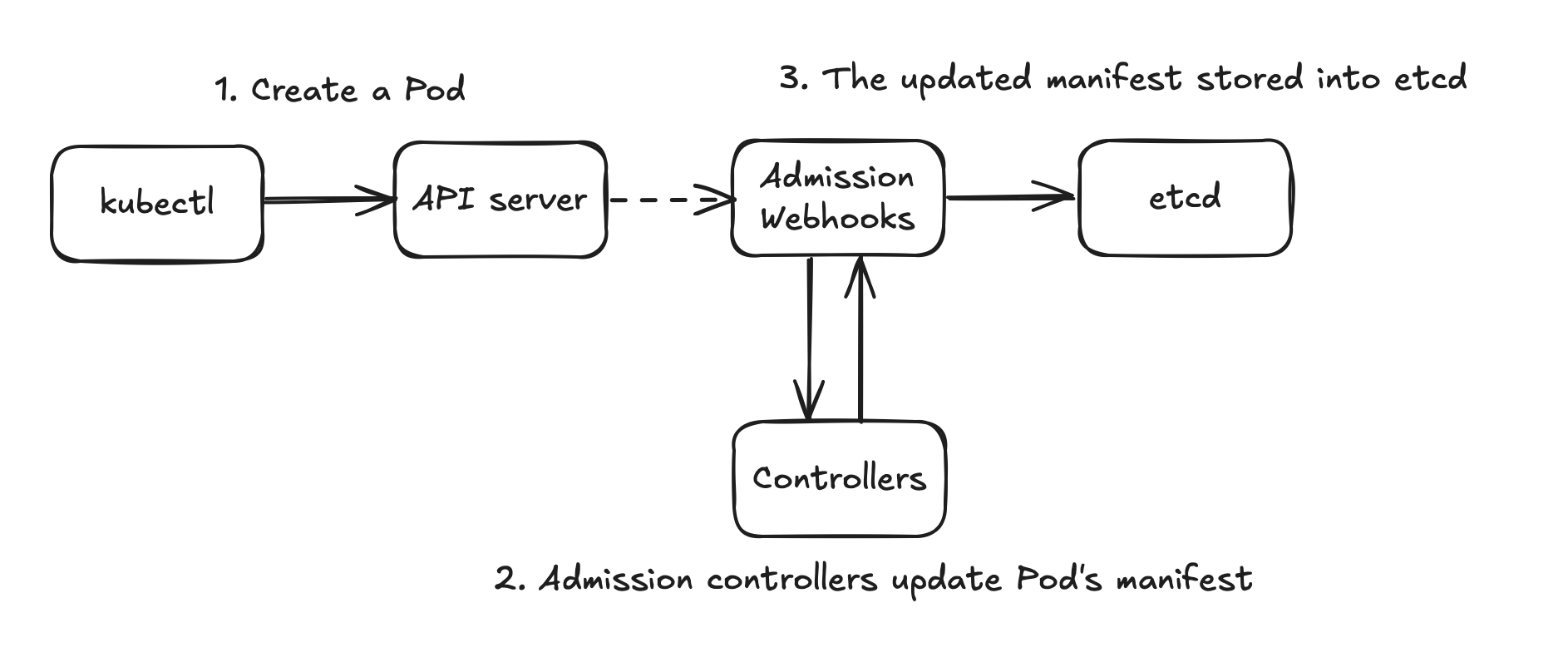
Step 2: Injected Information in Newly Created Pods
When a Pod is created, the MutatingWebhook captures the event, and the Mutating Controller updates the Pod manifest by adding necessary information to make IRSA work. We can observe these changes using the kubectl get pod command:
$ kubectl get pod mypod -o yaml
apiVersion: v1
kind: Pod
metadata:
  annotations:
    kubectl.kubernetes.io/last-applied-configuration: |
      {"apiVersion":"v1","kind":"Pod","metadata":{"annotations":{},"name":"mypod","namespace":"default"},"spec":{"containers":[{"image":"amazon/aws-cli","name":"s3-readonly"}],"serviceAccount":"s3-readonly-sa"}}
  creationTimestamp: "2024-10-29T20:24:42Z"
  name: mypod
  namespace: default
  resourceVersion: "97891577"
  uid: 00000000-0000-4000-8000-000000000000
spec:
  containers:
  - env:
    - name: AWS_STS_REGIONAL_ENDPOINTS
      value: regional
    - name: AWS_DEFAULT_REGION
      value: eu-west-1
    - name: AWS_REGION
      value: eu-west-1
    - name: AWS_ROLE_ARN
      value: arn:aws:iam::123456789012:role/AmazonEKSPodS3ReadOnlyAccessRole
    - name: AWS_WEB_IDENTITY_TOKEN_FILE
      value: /var/run/secrets/eks.amazonaws.com/serviceaccount/token
    image: amazon/aws-cli
    imagePullPolicy: Always
    name: s3-readonly
    resources: {}
    terminationMessagePath: /dev/termination-log
    terminationMessagePolicy: File
    volumeMounts:
    - mountPath: /var/run/secrets/kubernetes.io/serviceaccount
      name: kube-api-access-l9zvj
      readOnly: true
    - mountPath: /var/run/secrets/eks.amazonaws.com/serviceaccount
      name: aws-iam-token
      readOnly: true
  dnsPolicy: ClusterFirst
  enableServiceLinks: true
  nodeName: ip-192-168-1-10.eu-west-1.compute.internal
  preemptionPolicy: Never
  priority: 0
  priorityClassName: default-priority
  restartPolicy: Always
  schedulerName: default-scheduler
  securityContext: {}
  serviceAccount: s3-readonly-sa
  serviceAccountName: s3-readonly-sa
  terminationGracePeriodSeconds: 30
  tolerations:
  - effect: NoExecute
    key: node.kubernetes.io/not-ready
    operator: Exists
    tolerationSeconds: 300
  - effect: NoExecute
    key: node.kubernetes.io/unreachable
    operator: Exists
    tolerationSeconds: 300
  volumes:
  - name: aws-iam-token
    projected:
      defaultMode: 420
      sources:
      - serviceAccountToken:
          audience: sts.amazonaws.com
          expirationSeconds: 86400
          path: token
  - name: kube-api-access-l9zvj
    projected:
      defaultMode: 420
      sources:
      - serviceAccountToken:
          expirationSeconds: 3607
          path: token
      - configMap:
          items:
          - key: ca.crt
            path: ca.crt
          name: kube-root-ca.crt
      - downwardAPI:
          items:
          - fieldRef:
              apiVersion: v1
              fieldPath: metadata.namespace
            path: namespace
status:
...
The mutating webhook adds several components:
- Environment variables in
.spec.containers[].env: These variables are used by the AWS SDK to identify which AWS regional endpoint to interact with. - Volume mounts in
.spec.containers[].volumeMounts: These instruct kubelet to mount the secret token into the container’s filesystem. - Volumes in
.spec.volumes: Two volumes are configured - one for calling the Kubernetes API server and another for interacting with AWS API server.
Step 3: TokenRequest Initiated by Kubelet
When the Pod is created on a node, kubelet initiates a TokenRequest to the EKS control plane. The control plane returns a JWT token, which is stored in the mounted location:
bash-4.2# ls /var/run/secrets/eks.amazonaws.com/serviceaccount
token
bash-4.2# cat /var/run/secrets/eks.amazonaws.com/serviceaccount/token && echo
<redacted-example-jwt>
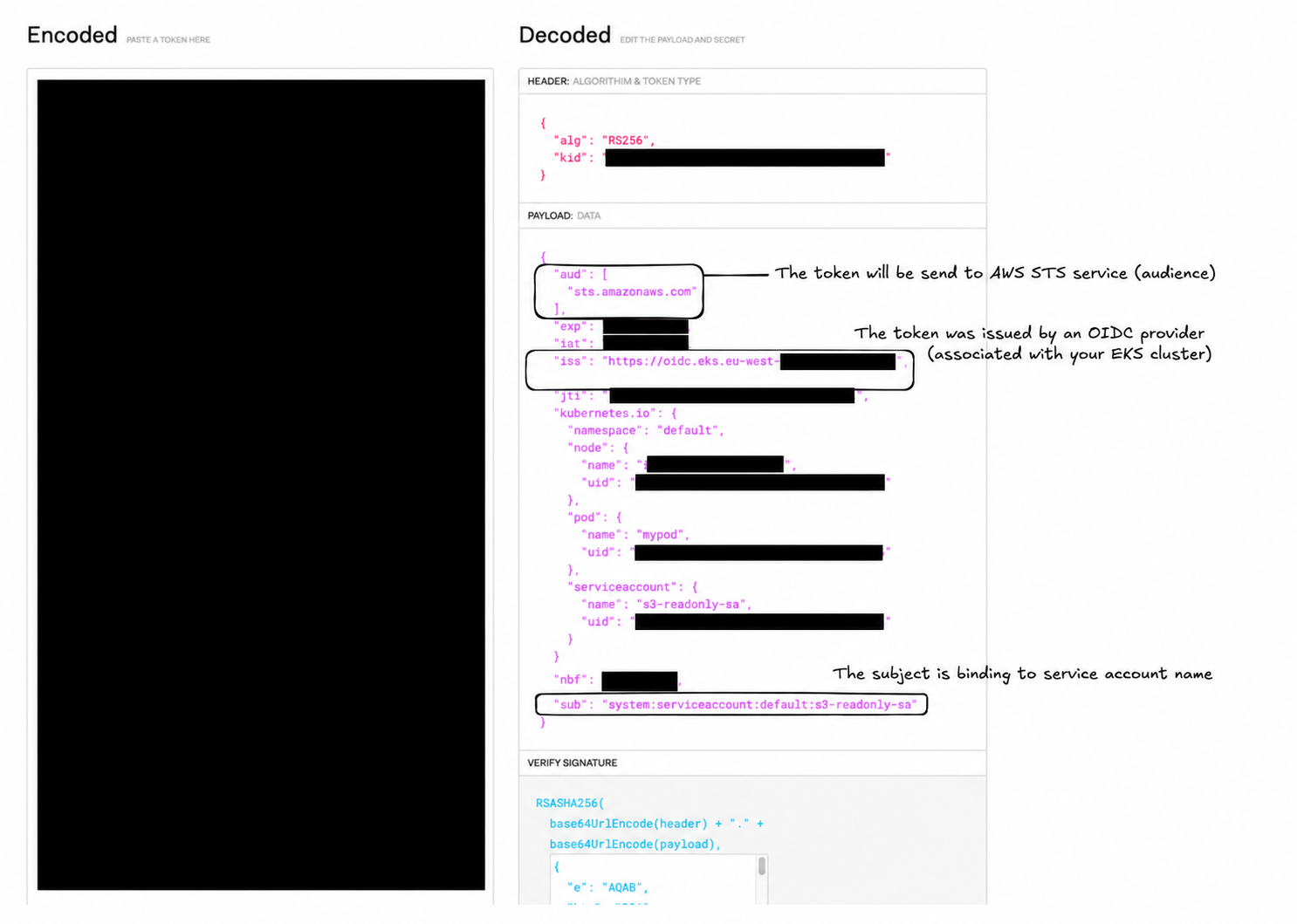
A JWT payload can be inspected locally; do not paste a live credential into a public website. The JWT documentation explains its structure. The information must exactly match what’s in the IAM Role’s Trust Entity; otherwise, you’ll encounter authentication errors when the Pod tries to authenticate with the AWS STS service.
The token payload includes the STS audience, issuer, expiry, and service-account subject. A sanitized illustration is:
{
  "aud": ["sts.amazonaws.com"],
  "iss": "https://oidc.eks.eu-west-1.amazonaws.com/id/EXAMPLEOIDCPROVIDER",
  "sub": "system:serviceaccount:default:s3-readonly-sa"
}
Step 4: AWS SDK’s Interaction with AWS STS Service
Finally, the program in the Pod uses the AWS SDK to interact with AWS APIs. The SDK looks for AWS credentials using the AWS_WEB_IDENTITY_TOKEN_FILE environment variable. The Pod then makes an AssumeRoleWithWebIdentity API call to assume the IAM role, granting it access according to the policies attached to that role.
bash-4.2# aws sts get-caller-identity
{
    "UserId": "EXAMPLEROLEID:botocore-session-1730234716",
    "Account": "123456789012",
    "Arn": "arn:aws:sts::123456789012:assumed-role/AmazonEKSPodS3ReadOnlyAccessRole/botocore-session-1730234716"
}

bash-4.2# aws s3 ls
2024-03-27 13:46:58 aws-codebuild-output-test
What Happens Without a Dedicated IAM Role?
If you don’t configure your application with a dedicated IAM role, the Pod (AWS SDK) will attempt to get credentials from the EC2 Instance Metadata Service (IMDS). Here’s the workflow:
- AWS SDK fails to find credentials in local files (e.g.,
/var/run/secrets/eks.amazonaws.com/serviceaccount/token) - AWS SDK attempts to get credentials by calling the EC2 Metadata Service IP (169.254.169.254)
- The request travels through the Pod’s default gateway to the EKS node’s main interface (eth0)
- The EKS node forwards the request to EC2 Metadata Service and receives temporary credentials
- The EKS node returns the credentials to the Pod
This approach has a significant security implication: the Pod inherits all permissions granted to the EC2 instance. EKS worker nodes typically have several AWS managed IAM policies for tasks like pulling images from ECR or attaching network interfaces to EC2 instances.
While it’s possible to use the EKS worker node’s IAM role for Pods, this practice poses security risks to your AWS account and should be avoided.
Conclusion
We’ve explored the internal mechanisms of how IRSA works within Pods and EKS. This understanding is crucial for proper implementation and troubleshooting. Feel free to share any questions or comments!
Thanks for reading. Have a question or a different perspective?
Follow via RSS →